

Help centre
Questions, answered.
100+ answers about your account, your transfers, and how we keep your money safe. Still stuck? Talk to us.
Registration & Onboarding
Is there an age limit to open an account?
Yes, you must be at least 18 years old and legally permitted to use our services under the laws of your country of residence or citizenship to be able to open an account with us, thus agreeing to our Terms and Conditions.
What documents do I need for Individual account registration and verification (KYC)?
For individual accounts, you will need:
a valid government-issued photo ID (e.g., NRIC/FIN for Singapore citizens/PRs/residents, passport/national Identity card for foreigners) (customer’s full legal name and address are to be clearly shown on the document),
selfie verification within our KYC process with liveness test,
proof of residential address. One of the following documents showing your name, address, date of issue, and issuing authority, and not older than 3 months:
- Bank statements
- Screenshots of bank statements are not accepted. Please download it from your e-banking and upload into our onboarding.
- Utility bills
- Home phone, internet or TV bill, Water, electricity or gas bill, Other utility provider
- Government-issued documents
- Letter or notification from government agencies, Certificate of voter registration, Tax assessment, Temporary registration sheets / Affidavit / Vehicle registration certificate
- Mobile operator bill
- Statements and bills for mobile communications
> We do not accept:
- Screenshots
- Receipts for purchases
- Medical bills
- Bank statements
What documents do I need for Business account registration and verification (KYC)?
In order to open a Business account, you first need to have an approved Individual account. Then you may use the ‘Open business account’ section on your profile page of the Walletory App, and click on ‘Apply Now’ button which will lead you to a short questionnaire.
Our representative will then contact you via email with details regarding the required documents. The typical list includes the following:
Certificate of Incorporation (notarised within past 6 months)
Corporate (Registration) Extract / Certificate of Incumbency (notarised within past 6 months)
Memorandum and Articles of Association / Constitution (notarised within the past 6 months)
Proof of Physical Address of Operating Place of Business (issued within past 3 months). Examples of POR:
* utility bill
* bank statement
* official letter from government
Certified/Notarised copies of Passport and Certified/Notarised Proofs of Residence of Director(s) and Shareholder(s)
Passport: minimum 3 months validity remaining
Proof of address: issued within the past 3 months. Examples of POR:
* utility bill
* bank statement
* official letters from government
Board Resolution for account opening*
Authorised Signatory list (who has the authority to operate Walletory account)*
Business activity table (template attached)
* Board Resolution for account opening and Authorised Signatory list have to be signed as per the company constitution or by the majority of directors in the company.
** All of the above documents would be also required for any corporate shareholder owning =/>25% of the company shares directly or indirectly.
How to take a selfie during the onboarding process
We’ve designed an automated verification process. Simply follow the on-screen instructions to complete your selfie verification.
How long does the registration and verification process take?
Once all required documents are submitted, the verification process for an individual account typically takes 1 (one) business day. We will always notify you via email once your account is activated.
The business account opening process requires more time as we need to verify more documents, but if the package is complete, it may take 1-3 business days to be reviewed. In case of any issues or questions, we will always reach out to you.
I have not received an email confirming my registration
Please check your spam/undesired/promotions/offers folder for an email from no-reply@walletory.com by Walletory.
If you did not receive it, please contact our Support.
Account Information & Management
Can I open multiple accounts?
All customers are limited to one account but it’s possible to open 2 (two) wallets per currency in any account.
How can I open an additional wallet?
- In Walletory App, select ‘Wallets’ from the main menu on the top.
- Click ‘Add’ in the top right corner.
- Create Name for your new wallet and choose the Currency in which you want the new wallet to be.
- Click ‘Add’ to confirm - you are all set!
What is a Primary wallet?
Primary wallet is the one funds are sent to (in that particular currency) when a particular wallet is not noted in the transfer request (e.g. when paying to a saved recipient (email) or when requesting money from another Walletory user). Only one wallet per currency can be Primary.
How can I change my Primary wallet?
To change the Primary wallet:
- Select the wallet that you want to make Primary.
- In the right-hand menu, click on ‘Edit’
- Here you can change the Name of the wallet and - use the toggle to make it Primary
- Click ‘Save’ to confirm
How many wallets can I make within my account?
You can create a maximum of 2 (two) wallets per currency in the Walletory App. If you require more, please contact our Support team.
Can I change my account type?
We currently offer the following types of accounts: Individual (personal) and Business (which in turn can be Corporate or Merchant). Personal accounts are for your personal remittances and receipts. Business accounts can be opened by companies and sole proprietors for business payments and receipts.
If you already have an approved Individual account, you cannot change it into a Business one, but rather apply for a business account from the Walletory App while in your profile: you may use the ‘Open business account’ section on your profile page, and click on ‘Apply Now’ button which will lead you to a short questionnaire. A member of our team will inform you of further steps and documents required and our Compliance department will review the corporate documents you have provided and will make a decision about your request accordingly.
The default account type for a Business account is Corporate. If you wish to change your Corporate account to a Merchant one, please contact our Compliance team to receive corresponding Terms and Conditions and Fee table.
How does a Business account work?
Access to the Business account is managed through a personal account. There can be multiple users tied to a Business account, each user has to have an approved Individual Walletory account and be authorised to use the Business one through the Authorised signatories list. With it, you will be able to pay invoices, transfer money, top up and withdraw from it.
What is the difference between a Corporate and a Merchant account?
Business account is created as Corporate one by default. The difference between a Corporate account and a Merchant one is simply whether you want to collect payments from your clients via some of our offered products (e.g. payment gateway) - (a service of “debt collection” or “merchant acquisition”). So, Merchant account includes all the functions of a Corporate one, with the addition of accepting customer payments. If you want to do so, please contact our Compliance to receive Merchant Terms and Conditions and Fees.
Does my account ever expire?
In the event that your account remains inactive for a period exceeding 18 (eighteen) months, we shall impose a monthly dormant account fee as outlined in the Fee Schedule.
This Fee shall be deducted from the dormant account balance until either the Account becomes active, or the Account holder (you) requests closure of the Account, or the Account balance reaches zero, whichever occurs first.
What are my account limits?
You may find your balance/transaction limits in your profile in Walletory App.
Higher volume transactions may require enhanced due diligence due to AML and CFT regulations.
Individual customers who are Singapore residents have statutorily restricted limits: SGD 20,000 balance and SGD 100,000 outgoing over 12 (twelve) months, in accordance with Payment Services (Amendment No. 2) Regulations 2023.
I cannot log into my account, what shall I do?
Please check that you are logging into the login page here: on our website www.walletory.com, in the top right-hand menu find the ‘Sign in’ button:
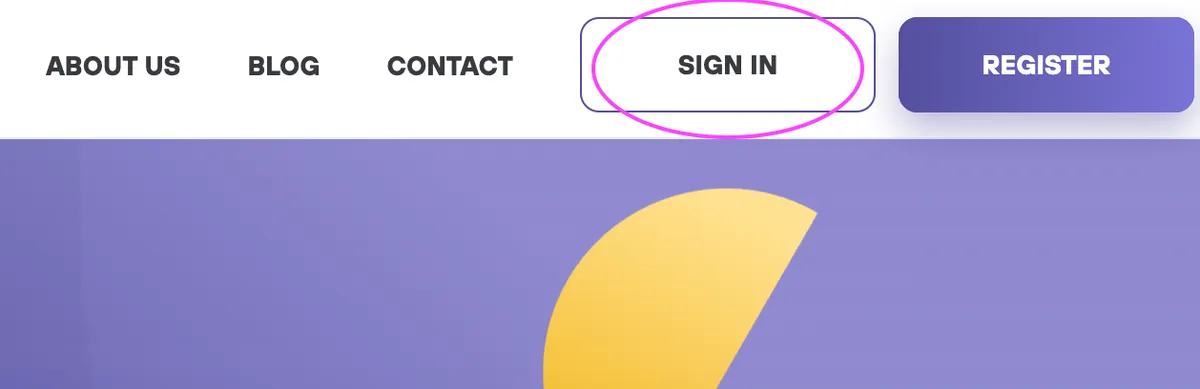
In the newly opened window for the login details, check that you are inputting the correct email address and password combination.
If you have forgotten your password or would like to reset it, please click “Forgot Password” on the login screen and reset your password. If you still cannot log in, reach our to us via the Contact form on our website:
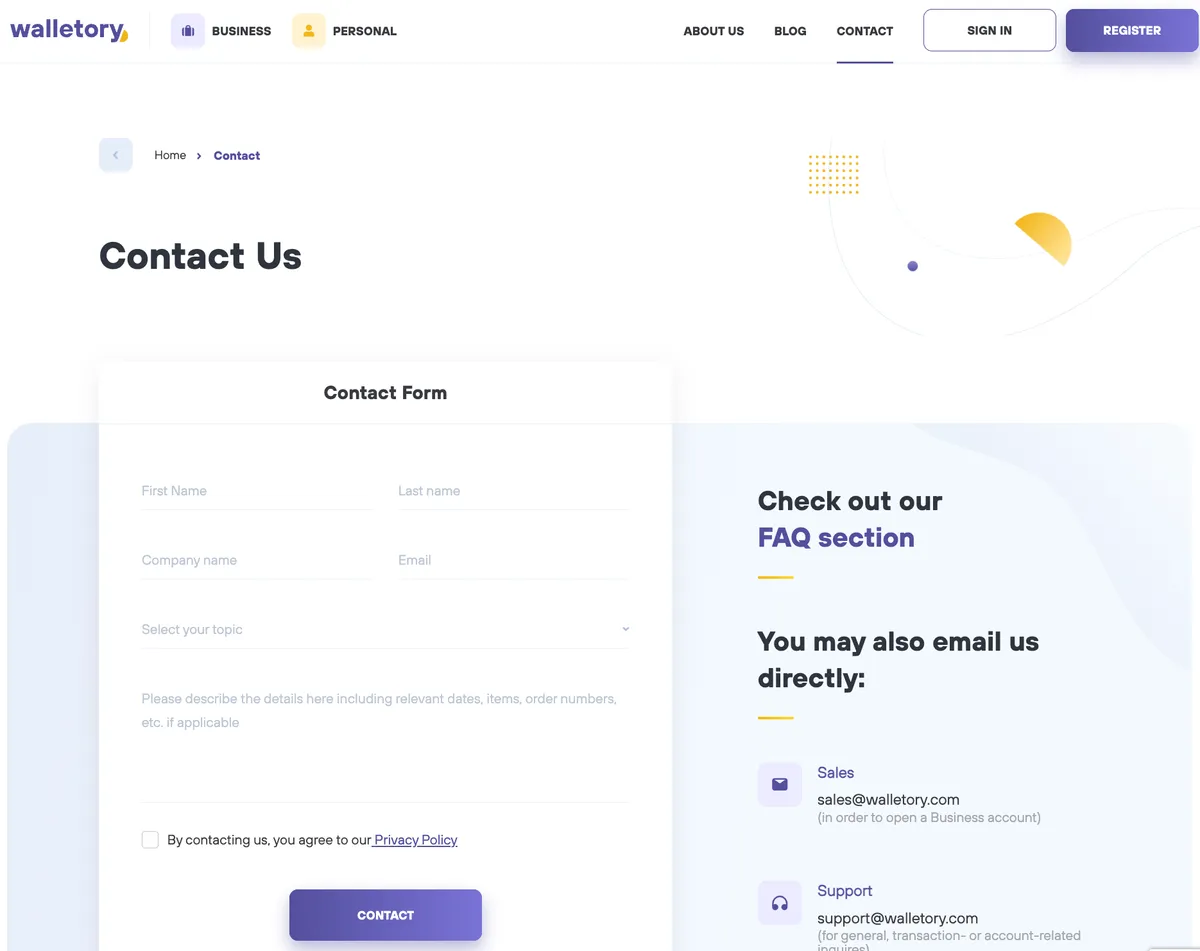
We recommend using Google Chrome as your browser.
What should I do if I experience a malfunction, such as something doesn’t display properly or I can’t click a button?
Please try restarting your device, clearing your browser cache, accessing the site in private mode, or using a different browser.
If the problem persists, please contact our Support from your registered email (or via our Contact Form) and include a screenshot of the page where you’re experiencing the issue.
What if I forget my password? How can I reset it?
On the login page, click on ‘Forgot Password’ on the login screen and follow the instructions. A password reset link will be sent to your registered email address.
How can I download a wallet statement?
- In the Wallets menu click on the wallet you want to download a statement for.
- In the bottom right menu box you will find all the Statements available for that wallet - monthly and yearly, depending on how long you have had this wallet opened.
- Find the period (month/year) you want the statement for and click on PDF or CSV, depending on the format you need.
- The statement in the desired format is downloaded and opened immediately.
How do I close my account?
If you wish to close your account, please contact our Support team. We will guide you through the necessary steps and ensure all outstanding balances are settled.
General Info & Limits
Why did I receive less money?
Walletory started charging fees as of September 1, 2026. After that date, new fees are applied which are available in your Walletory App, or before you approve a transaction.
Also, the sending, receiving or intermediary banks may apply their own fees. These charges are more common with international transfers. If your transfer involved a currency exchange, the sending bank may also apply an exchange fee.
How can I add or delete a recipient?
How to add a recipient
Click ‘Recipients’ on dashboard

There are 2 sections: ‘Walletory recipients’ and ‘Bank recipients’. If you plan to pay recipients within Walletory, click ‘+Add’ in the ‘Walletory recipients’ section. If you plan to pay recipients at external banks, click ‘+Add’ in the ‘Bank recipients’ section.

Fill in all necessary information in next window
Click ‘Add’ to confirm
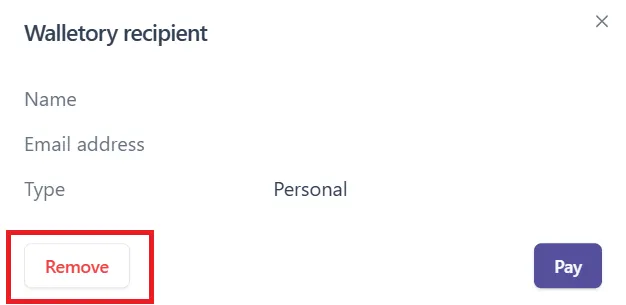
How to delete a recipient
Click ‘Recipients’ on dashboard
Select the recipient you want to delete.
Click ‘Remove’ to confirm
What currencies do you support?
At the moment we support SGD, EUR, USD, CZK, PHP, and JPY. Please refer to our Walletory App for the full list of supported currencies that you can create wallets in.
What are your fees for various transaction types, deposits and withdrawals?
Retail (individual) customers started paying fees on September 1, 2026. Detailed Fee Schedule can be found here. The fees can also be seen before customer finalises a transaction, where applicable.
One always may, however, incur other expenses when they send money between their wallets in different currencies (due to a foreign exchange transaction), and experience fees by their bank when they top up or withdraw money, or send international (SWIFT) payments.
Our corporate fees vary depending on the transaction type, amount, and currency. A detailed Fee Schedule is available in your Terms and Conditions, and any updates are also sent to the corporate account’s registered email address.
How long do transactions take to process?
We typically process transactions on our end within 1 (one) business day. However, ‘wallet-to-wallet’ transactions are usually executed instantly.
Please refer to the information below for the number of days it takes for the funds to be credited to the recipient’s external bank account after initiating a bank transfer via Walletory:
Domestic*/SEPA** bank transfer: 1-2 business days
SWIFT bank transfer: typically 3-10 business days
* Domestic payments are transactions where both the sender and the recipient hold accounts in banks within the same country (Singapore or Japan).
** Applies to payments in EUR between banks located in SEPA member countries
What are my transaction limits?
See the detailed response to the inquiry on account limits here.
Why was I asked for additional information about my transaction?
For security and compliance reasons, we occasionally need to request additional information about your transactions or to verify your identity. These requests are part of our commitment to maintaining secure financial practices and protecting your account.
How do I submit the information?
- Follow the instructions you see in an email from Walletory and submit what’s required in the way it’s requested to be submitted
- Make sure the documents you upload are clear, readable, and include all the necessary details specified in the verification instructions
Can I receive my salary into my Walletory account?
Yes, you can receive your salary into your Walletory account, though this depends on your employer’s policy and payment methods. If your employer has a Walletory Business account, they can send your salary directly to your personal Walletory account for instant access. Simply ask your employer if they can direct your payments to your Walletory account.
What types of payments can I make/receive?
| Types | Currency | Incoming Payment | Outgoing payment |
|---|---|---|---|
| SEPA *¹ | EUR | Supported for corporate/merchant clients | Supported |
| SWIFT | EUR, USD, JPY, SGD, CZK | Supported | Supported |
| Domestic in Singapore*² | SGD | Supported | Supported |
| Domestic in Japan*²*³ | JPY | Supported | Supported |
| Domestic in the Philippines*² | PHP | Supported | Supported |
| Wallet to Wallet | EUR, USD, JPY, SGD, PHP, CZK | Supported | Supported |
| Exchange | EUR, USD, JPY, SGD, PHP, CZK | Supported | Supported |
*¹ Applies to payments in EUR between banks located in SEPA member countries
*² Domestic payments are transactions where both the sender and the recipient hold accounts in banks within the same country.
*³ If a customer has more than one JPY wallet, the JP local bank wire details are visible only in the linked wallet, not in all wallets in JPY.
Top-up
How do I add money to my wallet?
Select the wallet to which you want to send money
Click ‘Top-up’

Select bank option if it shows more than one
Check ‘Bank transfer details’ and send money from your bank account to the noted bank account with the displayed Reference information accordingly.
Can someone other than the registered account holder make a deposit into that account/wallet?
Deposits/pay-ins/top-ups can be made by the registered user as well as third parties.
However, if you want to collect payment from clients on a more regular basis and/or in a more convenient way, please contact us to open a Merchant account for you.
Which bank account information is required for receiving funds?
Select the wallet to which you want to add money
Click ‘Top-up’
On the next page, select a bank/payment method from the available options
Review the payment details and transfer money from your bank using this information.
I entered incorrect information when making a bank deposit. What should I do?
Please immediately contact your sending bank in order to amend the details from their end. Then, contact our Support desk. We will guide you through the process and request the necessary information about your deposit case by case to ensure proper processing.
How can I locate a bank transfer sent to my Walletory account?
General bank transfer timeframes are the following:
- Domestic/SEPA bank transfer: 1-2 business days
- SWIFT bank transfer: typically 3-10 business days
* Depending on your bank, it may take time for the funds to be reflected in your bank account.
** Remember to count only business/bank days when calculating the expected arrival time - weekends and public holidays don’t count.
If the timeframe has not passed
If the estimated arrival date hasn’t yet passed, there’s no need to worry. Your transfer is progressing as scheduled and will be processed accordingly.
If the timeframe has passed
If the expected timeframe has passed and your transfer hasn’t arrived, first check your other currency wallets to see if the transfer was received in a different currency. If not:
- Request a transfer confirmation document from the sender’s bank.
- Verify that the details on the confirmation match the details provided in your Walletory account.
- Ask the sender bank to trace the transfer.
The transfer shows in your App but remains incomplete
If the transfer is shown as ‘Processing’:
- We may need additional information from the sender’s bank
- The transfer might require an additional review to comply with regulatory requirements
Can I receive large bank transfers into my wallet?
There is no maximum limit on the amount you can receive into your wallet via bank transfer. This applies to both international and local transfers, except local transfers in Japan (see those limits in the article Limits for domestic bank transfers in Japan). For certain transfers that may have limits (also see the article What are my account limits?), where a source of funds document may be needed, we’ll always notify you by email.
Wallet to Wallet
How can I move money between my wallets?
Select the wallet from which you want to move money
Click ‘Move money’

Select the wallet to which you want to move money
Enter the amount and add a note (optional)
Click ‘Move’ to confirm
You can move money between wallets of the same currency. If you want to exchange money within your wallet, please check the FAQ ‘How can I exchange currency?’.
How can I send money to another Walletory customer?
Select the wallet from which you want to send money
Click ‘Pay’ and select ‘To Walletory user’
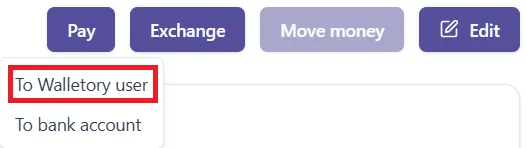
Enter their email address, Wallet ID, or select an existing recipient.
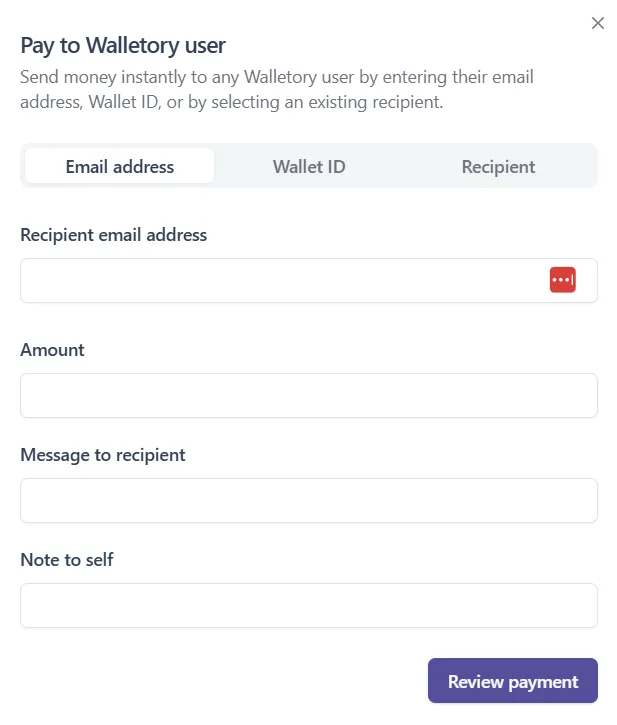
Enter the amount you want to send and add an optional message or note if you like
Click ‘Review payment’
Check the verification code sent to your registered email address and enter it
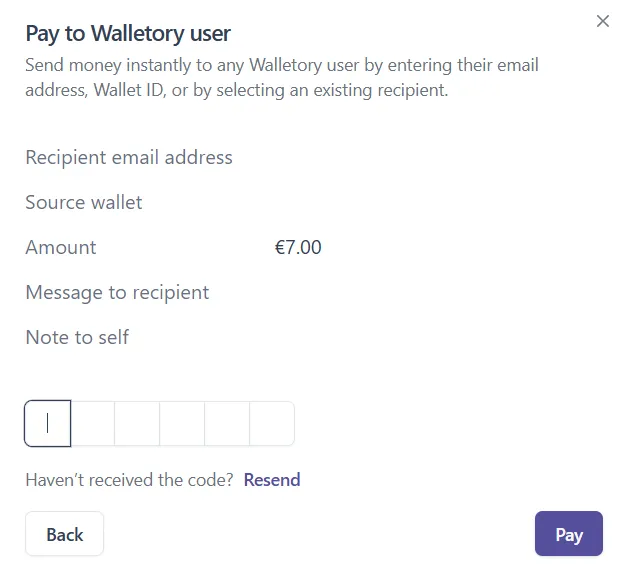
7. Click ‘Pay’ to confirm.
How do I send money to another Walletory user’s particular wallet?
Select the wallet you want to send money from
Under ‘Pay’ select ‘To Walletory user’
Fill in the recipient’s Wallet ID

Fill in the Amount that you want to send Fields ‘Message to recipient’ and ‘Note to self’ are optional.
Click ‘Review payment’
In the next window, fill in the verification code that was emailed to your registered email
Click ‘Pay’ to confirm
What are the fees for transferring money to other Walletory customers?
We don’t charge individual customers any fees for transferring money to other Walletory customers via Wallet-to-Wallet function. For other fees, please refer to Fee Schedule.
For business customers - please refer to the Fee Schedule you have received along with your Terms and Conditions.
When will my payments to/from other Walletory customers be reflected in the App?
Wallet-to-Wallet money transfers are typically processed instantly and thus are immediately reflected in both sender’s and recipient’s wallets.
Money Requests
How can I request money?
Click on ‘Payment requests’>’Request payment

Request money from any Walletory user by selecting an existing recipient or entering a new recipient’s email address.
Select the currency, enter the amount you want to request, and add a message (optional).
Click ‘Request’ to confirm.
How can I accept a money request?
Click on ‘Payment requests’

Click on the relevant request on ‘Incoming requests’ section
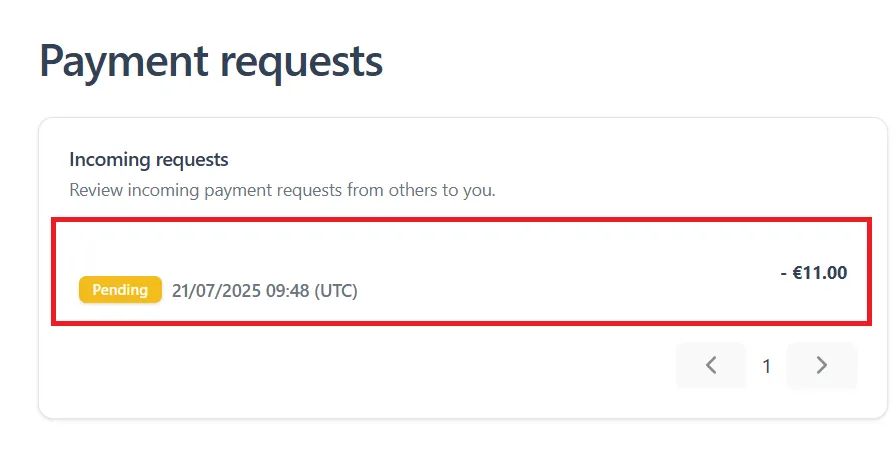
Check details and click ‘Accept’ to confirm
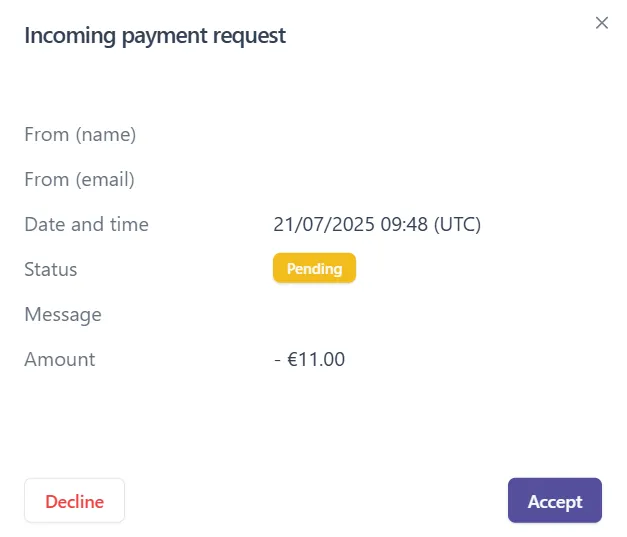
Find the verification code sent to your registered email address and enter it
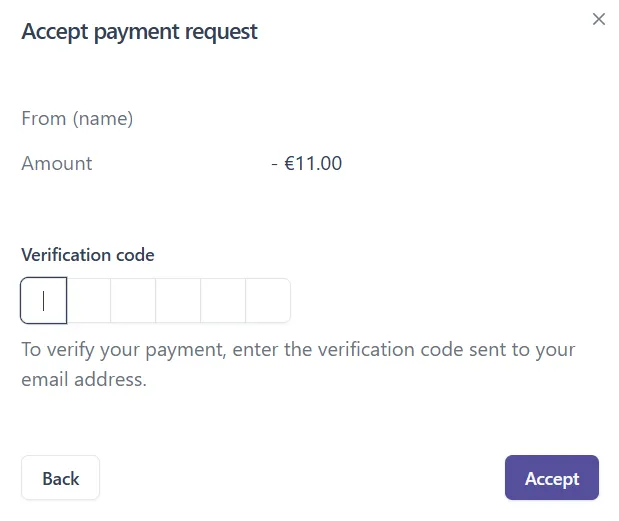
Click ‘Accept’ to confirm.
How can I decline a money request?
Click on ‘Payment requests’
Click on the relevant request from ‘Incoming requests’
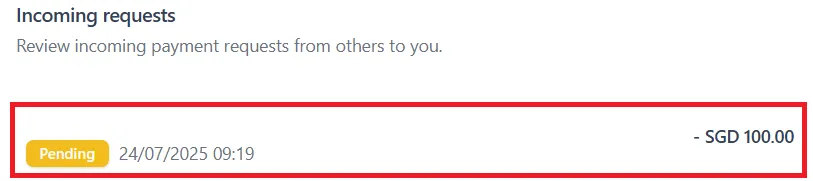
On the next page, click ‘Decline’
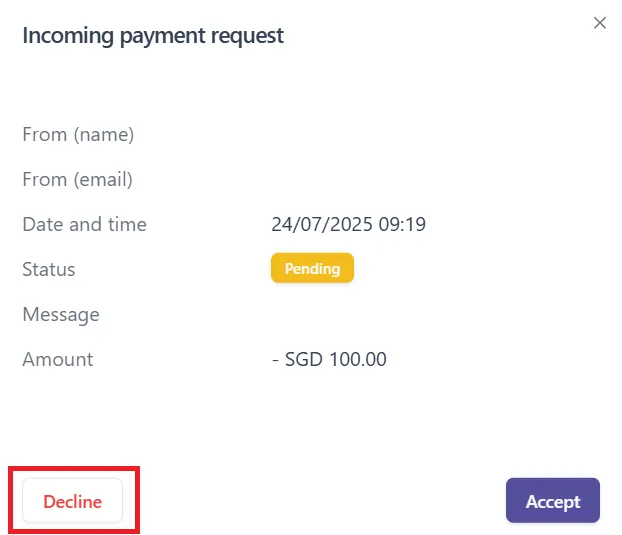
On the next page, optionally enter a reason for declining and click ‘Confirm to decline’
How can I cancel a money request?
Click on ‘Payment requests’
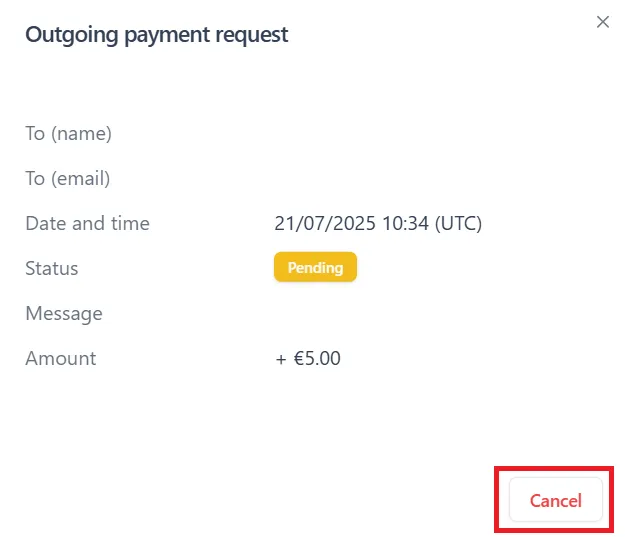
Click on the relevant request in the ‘Outgoing requests’ section. You can cancel only Pending requests.
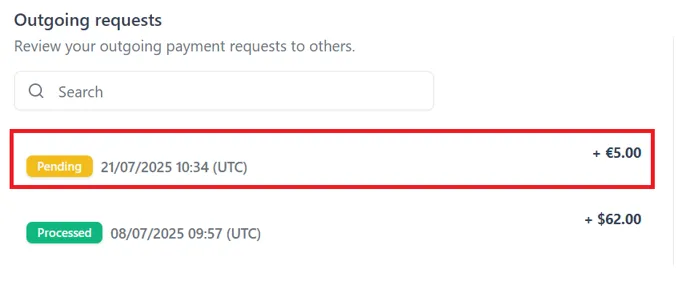
Click ‘Cancel’
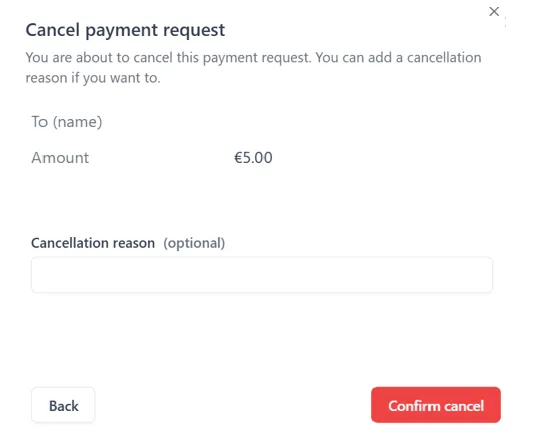
Optionally, enter a cancellation reason and click ‘Confirm cancel’
Do payment requests expire?
The validity period is 14 (fourteen) calendar days, and both parties will be notified via email when it expires.
Expired requests cannot be processed - a new request is required.
E-money Exchange
Exchange rate/fees and transaction limits
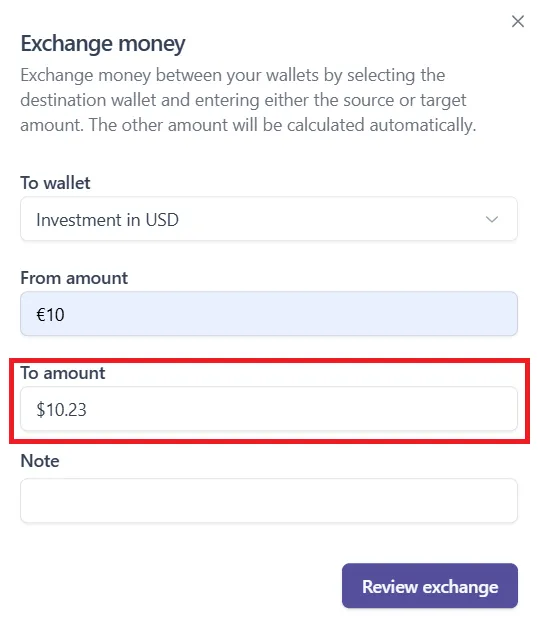
In the exchange window, you see the final amount after the currency exchange. There is no limit on how much you can exchange between currencies.
How can I exchange currency?
Go to the relevant wallet that you want to exchange from
Click ‘Exchange’

Select the wallet you want to exchange to and enter the amount you wish to exchange (you have to have sufficient funds in the sending wallet)
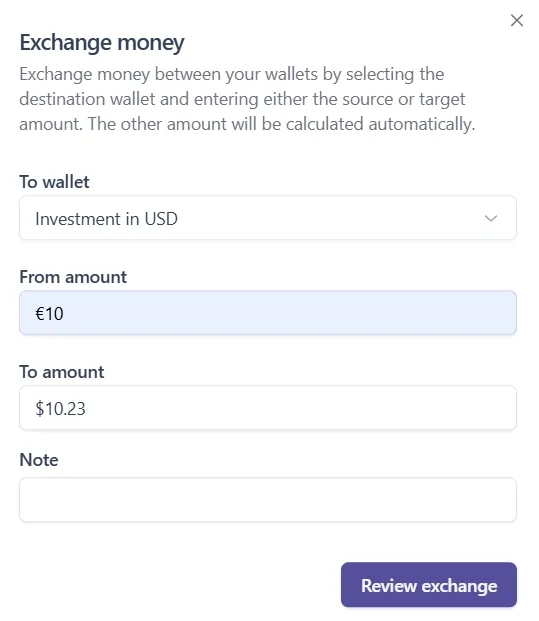
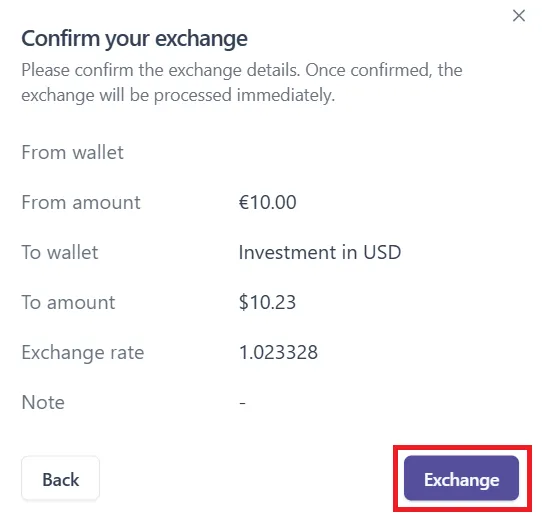
Click ‘Review exchange’
On the next page, click ‘Exchange’ to confirm
What currencies can be exchanged?
Walletory enables you to exchange between USD, EUR, SGD, PHP, CZK, and JPY currencies.
When is the currency exchange service available?
You can exchange currencies between your wallets 24/7 directly in Walletory App. You have to ‘Review exchange’ to check the exchange rate and the resulting amount in order to confirm the transaction.
When is the exchange reflected?
It will be proceeded and reflected from instantly to within 1 (one) working day.
Payouts
How do I send money to a bank account?
Select the wallet from which you want to send money
Under ‘Pay’ select ‘To bank account‘
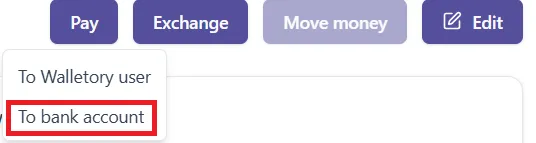
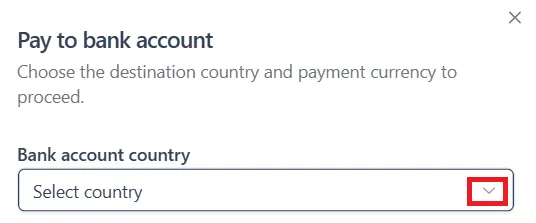
Select the destination country from the dropdown menu
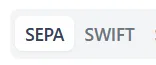
Select payment method
Fill in all required information for your selected payment method
Click ‘Review payment’
In the next window, fill in the verification code that was emailed to your registered email
Click ‘Pay’ to confirm
How can I locate a bank transfer sent from Walletory?
First, please find out your transaction status on Walletory App.
Go to the relevant wallet
Select the relevant transaction in the ‘Transactions’ section
You can find the status in the pop-up window:
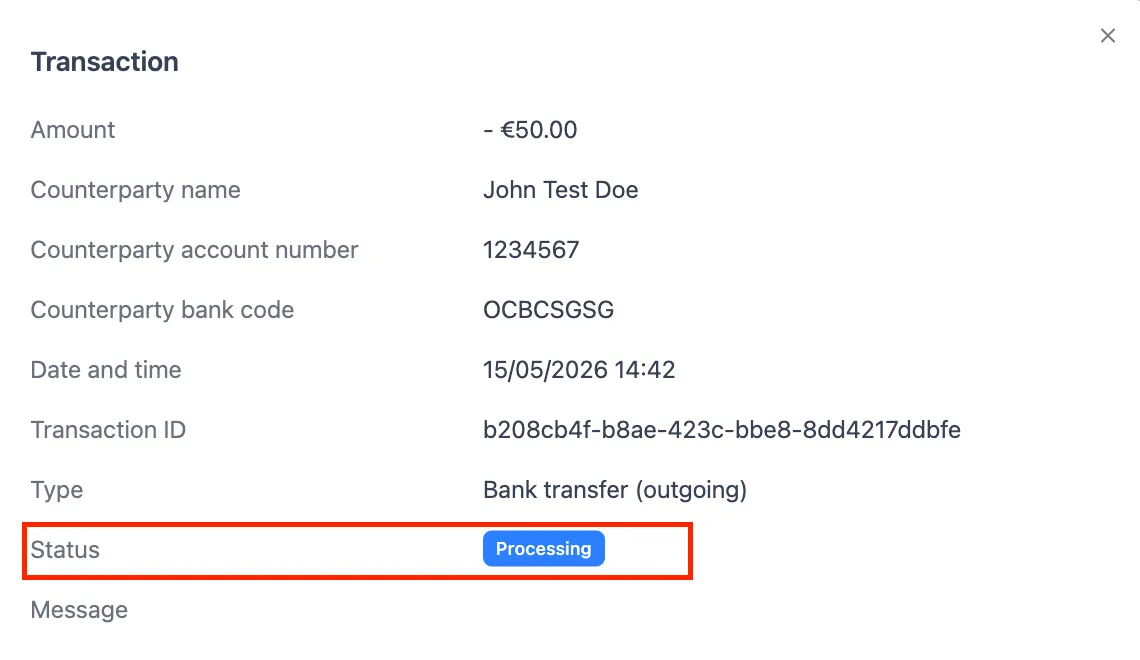
Transfer is ‘Processing’
We usually proceed outgoing payment requests within 1 (one) business day.
Delays may occur for several reasons:
- Payment requests submitted on weekends, when processing is suspended
- Additional verification required
- Missing or incomplete information
- Incorrect recipient bank details
Transfer is ‘Processed’, but the recipient hasn’t received it
General bank transfer timeframes (once the transaction has been processed by Walletory) are the following:
- Domestic/SEPA bank transfer: 1-2 business days
- SWIFT bank transfer: typically 3-10 business days
After a transfer is completed, recipient banks may take additional time (1-2 business days) to credit the funds to the recipient’s bank account.
If the withdrawal takes longer than expected, please contact our Support desk. Depending on your withdrawal method, we can provide a transfer confirmation to help the recipient’s bank trace the funds. (Note: transfer confirmations are not available for Japanese domestic bank transfers.).
Is there a minimum withdrawal amount?
There is a minimum net transfer amount (meaning: the amount you expect to receive after the withdrawal fee is implemented) imposed on SWIFT withdrawals, it is the equivalent of: 20 USD / 20 EUR / 3,500 JPY / 450 CZK / 20 SGD - depending on which currency your wallet and bank account are in.
For SEPA and domestic bank transfers in Singapore and Japan, there are no minimum withdrawal/payout amounts.
Where can I send money?
You can send funds to anywhere in EUR, USD, JPY, CZK, and SGD, besides restricted countries (see our Prohibited and High-risk Jurisdictions).
For accepted countries, please see the dropdown menu in ‘Pay-To bank account’ function right in Walletory App.
Can I make a local transfer in a different currency?
No, you can only send money in the same currency as the wallet you’re sending from.
This applies to international bank transfers as well.
I requested a pay-out from Walletory to my bank account, when will I receive the funds?
We typically process transactions on our end within 1 (one) business day.
Please refer to the information below for the estimation of time it takes for the funds to be credited to the recipient’s bank after completing a bank transfer via Walletory:
- Domestic/SEPA bank transfer : 1-2 business days
- SWIFT bank transfer: typically 3-10 business days
The FAQ ‘How can I locate a bank transfer sent from Walletory?’ might also be helpful for you
What is the remitter name that appears for bank transfer withdrawals?
For international bank transfer withdrawals (SEPA / SWIFT), the remitter name that appears will be “Walletory Pte Ltd”.
For domestic bank transfer to a bank account in Singapore, the remitter name that appears will be “Walletory Pte Ltd”.
For domestic bank transfer to a bank account in Japan, the remitter name that appears will be “MaxConnect”.
Payments processing FAQ
How do I track my payment?
You can see the status of your payment directly in ‘Transactions’ in the desired wallet within your Walletory App. For international transfers, we may provide a tracking reference number, please inform us if you need one after completing such transfer request.
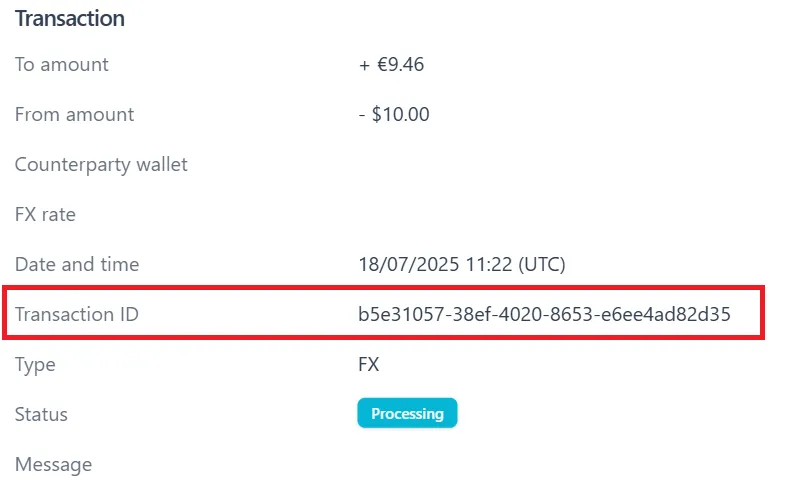
Where can I find Transaction ID?
Go to the relevant wallet
Select relevant transaction on ‘Transactions’ section
You can find the ID on the next page
Can I deposit cash to Walletory?
Unfortunately, we do not accept cash deposits to any Walletory account.
Limits for domestic bank transfers in Japan
There are limits as to how much you can withdraw or deposit via local rail in Japan, please see table below for reference. If deposited over the limit, the extra funds may need to be refunded and a refund fee implemented (see our Fee Schedule).
- Single deposit limit=1,000,000 JPY
- Monthly cumulative deposit limit=6,000,000 JPY
- Single withdrawal limit=5,000,000 JPY
Transaction Status & Issues
My transaction was declined. Why?
This may happen due to insufficient funds, overrunning a limit, incorrect transaction details, or security flags, please contact support@walletory.com or finance@walletory.com directly for resolution.
Transfer I sent from Walletory arrived to a bank account in a different currency...
When sending funds, please ensure that the recipient bank account supports the currency of the funds being sent. This ensures the funds are not exchanged at the beneficiary account.
If your transfer arrives in a different currency, it means you sent a currency that isn’t supported by the beneficiary account. This causes your money to be exchanged at the rate set by the beneficiary or intermediary bank. These exchange rates vary and aren’t controlled by Walletory.
For example, if you send USD to a JPY account, the beneficiary bank will convert your USD to JPY using their own exchange rate.
What happens if my payment is rejected?
If a payment is rejected, we will notify you as soon as possible. The funds will typically be returned to your account.
Please review the details of the transaction and contact our Support team if you need assistance.
Why was a bank transfer to my Walletory account reverted?
How to check why your transfer was reverted and what you can do:
- Check if you have received any communication from your bank requesting additional documentation or information
- You may also contact the bank that sent the funds back, or you may receive a message from them explaining the reasons and further actions.
When will I receive the reverted funds?
- The timing of the transfer reversal is determined by the originating bank. We cannot track or influence its status as we will not have received those funds in the first place.
Why was a bank transfer from my Walletory account reverted?
When a transfer is reverted, it means that although it was successfully sent, it was intercepted by an intermediary bank or rejected by the beneficiary bank. This can happen for several reasons, including, but not limited to:
- incorrect account details: The recipient bank may have rejected the transfer because the recipient’s account information didn’t match their records
- closed account: The recipient’s bank may have closed the account you’re attempting to transfer to
- incorrect currency: Some recipients’ accounts may only accept transfers in specific currencies
- wrong transfer type: The selected account might be unable to accept certain types of transfers (e.g., SWIFT or SEPA)
- compliance reasons: Your transfer may not meet regulatory requirements enforced by one of the banks involved in the transaction
When will I receive the reverted funds?
The funds will be credited back to your wallet once they have been received by Walletory.
I'm unable to send money to another Walletory customer
If you’re experiencing issues sending or receiving transfers from other Walletory customers, first verify that your account is properly approved and not under any restrictions. Ask the recipient to check their account status as well, since the problem might originate from their end.
- When your account is Approved, you will receive an automatic email about being approved and you can use your account.
- Your account may also be Rejected, Suspended, or Closed. If you want to find the reasons for this and learn how to proceed, please contact our Support team.
Compliance reasons
By law, Walletory must perform necessary security checks to validate all transfers. If your transfer fails to meet these requirements, it will be declined.
Insufficient funds
If you don’t have sufficient funds to complete a transfer, you won’t be able to fulfil a money request or send a new transfer. In this case, you should top up your wallet by either exchanging and moving funds you have in another wallet, or via deposit from your external bank account.
An expected money transfer from another Walletory customer wasn't received
If you’re having trouble locating a transfer sent by another Walletory customer to your wallet, here’s what you can do:
- Verify with the sender that they have entered your details, such as your Email address, or Destination Wallet ID, correctly.
- Check your wallets in other currencies.
If you’ve tried all of these options and still can’t locate the transfer, ask the sender to contact Walletory Support directly.
My transfer to another Walletory customer is pending, why?
Wallet-to-Wallet money transfers are typically processed instantly and are immediately reflected in your wallet.
However, transfers may be pending due to compliance requirements. By law, Walletory must conduct security checks on all transfers. If a transfer doesn’t meet these requirements, it may be declined or under additional review. We will notify you by email if this happens.
Can I cancel an outgoing payment?
Most wallet-to-wallet transfers are automatic and cannot be cancelled.
We may be able to cancel the payment if it has not yet been processed (i.e. its status is ‘Processing’).
If you suspect a mistake, contact us as soon as possible at finance@walletory.com with an urgent request to cancel it, and we will do everything possible to help you with that.
I received a transfer from an unknown sender…
If you receive an unexpected or unfamiliar transfer, please contact us as soon as possible via email. Our dedicated team will guide you through the necessary steps to help keep your account secure.
There is no wrongdoing in returning funds to the sender, and it won’t be associated with any financial losses.
I have sent money to my wallet by bank transfer. Can I cancel it?
Once a transfer has been completed, it cannot be cancelled. You may try to talk to your sending bank to attempt to cancel the transaction. Otherwise, if you wish, you can just withdraw the funds after they appear in your wallet.
Please be aware that starting from September 1, 2026, there are fees imposed by Walletory on bank transfers, and there may be fees imposed on the transfer by your bank.
Fraud & Scam Prevention
How do I know if the email I have received from Walletory is genuine?
Depending on the purpose of the inquiry, we’ll only reach out to you via email using one of our official email addresses. Check the email address of any email you receive to ensure it’s from one of the following:
- support@walletory.com
- compliance@walletory.com
- fraud-reporting@walletory.com
We’ll never ask you to provide one-time codes or your password over email, chat or phone. If you are in doubt about the authenticity of an email you’ve received, don’t share any personal or account information. Instead, email our Fraud Reporting Team at fraud-reporting@walletory.com.
What should I do if there are unrecognised transactions in my Walletory account?
If you are sure you did not make the transaction or believe the transaction is fraudulent, please take the following steps:
- Email & report your case to fraud-reporting@walletory.com.
- Change your Walletory account password.
- If you suspect that someone else has access to the email account you used to create your Walletory account, change the password of your email account as well.
What should I do if I suspect fraudulent activity on my account, or I see an unauthorised transaction on my statement.
If you suspect any unauthorised or fraudulent activity on your account, please contact us immediately at fraud-reporting@walletory.com. You can also contact us via Walletory App (while in your Profile, go to “Support”, and click on “Contact” button near “Report suspicious activity”).
How to prevent becoming a victim of fraud
If you receive a suspicious call, email, link, or message from someone claiming to be from Walletory, please stay alert and do not click on any links. Doing so helps protect your personal data and funds, and supports our efforts against cybercrime (as well as “phishing” attacks and other spam).
Walletory does not provide clickable links in our emails, and will never request payments, make unsolicited phone calls without prior confirmation/notification, or ask you to provide any verification or security codes over the phone or chat.
What to do if someone suspicious contacts you:
- Reach out to Walletory Support to confirm whether the contact is legitimate.
- Check the sender’s email address for spelling errors or strange formatting. Real emails will only come from the official Walletory domain (@walletory.com instead of @hotmail.com, @gmail.com, etc.).
- Do not share sensitive information if you are unsure whether the contact is legitimate.
You may want to log into your Walletory account and change your password (but never via following a link from an email).
What is a Kill Switch?
A Kill Switch is an emergency self-service feature that enables Walletory customers to immediately suspend access to their accounts.
Once activated, all transactions that have not yet been processed and all future transactions associated with the account will be blocked. User access will be disabled, and the user will be automatically logged out from all devices to prevent any further activity.
This function is designed for urgent situations, such as suspected fraud or unauthorised account access.
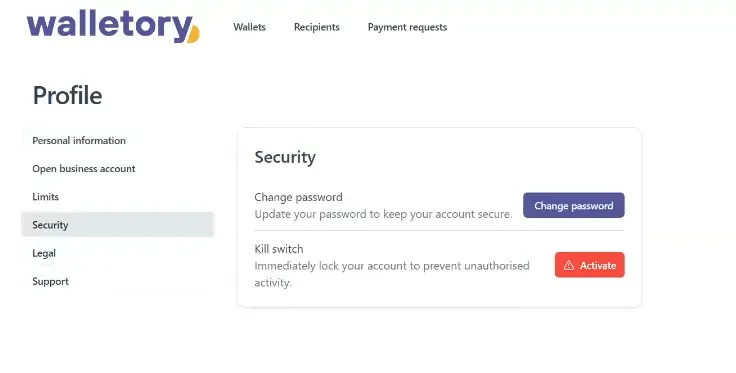
How to activate the Kill Switch
Navigate to Profile → Security → Kill Switch → Activate
What happens after the Kill Switch is activated?
Safety is our priority. Your Account access can only be reinstated by Walletory Compliance officers following the necessary verification checks, after which your account will be safely back in your hands.
Please contact us by emailing fraud-reporting@walletory.com as soon as possible.
If you did not activate the Kill Switch, please reach out to us at the same email address right away.
I received an email saying my device is in Cooling-off period, what does it mean?
The Cooling-off Period is a temporary security measure triggered when you log in from a new or unrecognised device, browser, or location.
We prioritise the safety of your funds. By implementing this period, we prevent unauthorised access and ensure that even if someone steals your password, they cannot immediately withdraw your assets. Please think of it as a “safety lock” that gives you time to alert us if the login wasn’t made by you.
What can I do during the Cooling-off period?
During this security window, your account remains active, but high-risk actions are restricted.
What you CAN do:
- Deposit Funds: You can receive funds into your wallet.
- View Balance: You can check your current balance and transaction history.
- Downloading Non-Critical Data: You can download your wallet statements.
- Contact Support: You can email us, if you have questions.
What you CANNOT do:
- Account & Security Changes:
- Change account password
- Initiate or confirm password reset (including 2FA steps)
- Payments & Money Movement
- Send money to another user within Walletory
- Send money to external bank accounts
- Create foreign exchange (FX) transactions
- Approve incoming payment requests
- Recipient Management
- Add a new recipient (internal or external)
- Delete an existing recipient
- Payment Requests
- Create a payment request
- Accept a payment request
- Initiate 2FA verification for payment requests
- Wallet Management
- Create a new wallet
How long does the Cooling-off period last, and can I skip it?
The Cooling-off Period lasts for 12 hours, according to regulation.
We understand this may be inconvenient, but it is a vital step in maintaining the highest level of security for your account.
Unfortunately, we do not allow for the override or bypass of the mandated cooling-off period.
Once the timer expires, all features will be automatically restored.
A restriction has been applied on my account due to a login I don't recognise. What should I do?
This may indicate unauthorised access.
Please contact us at fraud-reporting@walletory.com immediately. We will assist you in securing your account.
Which time zone is used in the Cooling-off period email?
The times shown in the Cooling-off period email are in SGT (Singapore time, equal to UTC+8). Please convert the start and end times to your local time zone based on your location.
Compliance & Safety
How do I update my personal information (e.g., address, phone number, email)?
If you need to update your registered personal information, please contact us at support@walletory.com using your registered email address.
For changes to critical information (e.g., name, address, business registration details), you may need to submit supporting documents. Please contact our customer support for guidance.
How do you protect my personal data?
We adhere to the Personal Data Protection Act (PDPA) in Singapore and implement stringent data protection measures, including encryption, access controls, and regular data security assessments, to safeguard your personal information. Please refer to our Privacy Policy for more details.
Is my money safe with your e-wallet?
Your funds are safely kept in a separate, customer-dedicated account at our custodian bank in Singapore. We do not hold your money with us. We are a MAS-regulated entity, hence we strictly follow the rules and regulations in safeguarding customers’ money.
Is Walletory a regulated company?
Yes, Walletory Pte. Ltd. is regulated as a Major Payment Institution (MPI) by the Monetary Authority of Singapore (MAS) under the Payment Services Act. This information can be verified on the MAS website here.
My account is suspended/locked. Why is it, and how can I reactivate it?
There are several reasons why your account might be suspended or locked, including KYC verification issues or account inactivity. Please contact our Support desk using your registered email address, and we will provide specific guidance for your situation.
What are your security measures?
Walletory is committed to protecting your account with industry-standard security practices. To prevent unauthorised access, we automatically lock accounts after multiple incorrect password attempts. Additionally, we require two-factor authentication (2FA) for all sensitive actions, adding an extra layer of protection to your account. We continuously review and improve our security to stay ahead of potential threats.
What is KYC/AML and why is it required?
KYC (Know Your Customer) and AML (Anti-Money Laundering) are regulatory requirements to prevent financial crime, such as money laundering and terrorism financing. As a licensed payment institution, we are legally obliged to verify the identity of all our customers and monitor transactions.
What will happen to my funds if Walletory becomes insolvent?
Customer funds are held in a separate account from Walletory’s operating funds, and we are not allowed to use customer funds for any business activities. In the event of Walletory’s insolvency, safeguarded funds are returned to customers in accordance with the Payment Services Act.
General Information and uncategorised FAQ
What is Walletory?
Walletory is a licensed payment institution regulated by the Monetary Authority of Singapore (MAS) under the Payment Services Act 2019. We provide a range of payment services, including domestic and international money transfers, e-wallet services, merchant acquisition.
Is Walletory licensed and regulated?
Yes, Walletory Pte. Ltd. is fully licensed and regulated as a Major Payment Institution (MPI) by the Monetary Authority of Singapore (MAS) under the Payment Services Act (2019).
This ensures we operate under strict regulatory oversight for your security and peace of mind.
Is Walletory free?
Opening a Walletory account is completely free of charge for retail/individual clients.
Starting from September 1, 2026, all Walletory customers are subject to payment processing fees. The current Fee Schedule may be found here.
Other fees that may be imposed on customers are external bank processing: particularly for SWIFT/international transfers, top ups from their deposits in those banks, etc., and they are not Walletory’s profit.
Our corporate fees vary depending on the transaction type, amount, and currency. A detailed Fee Schedule is available in their Terms and Conditions; any updates are also sent to the corporate account’s registered email address.
How can I contact Customer Support?
You can reach our customer support team via email: support@walletory.com, or by filling out our contact form.
What are your operating hours?
Our digital platforms are available 24/7.
For customer support, our team is available Monday to Friday, noon to 8:00 PM SGT (UTC +8), excluding public holidays.
How do I provide feedback or lodge a complaint?
We value your feedback! You can provide feedback or lodge a complaint through our website’s contact form, by emailing support@walletory.com, complaints@walletory.com or reporting@walletory.com, depending on whether you want to provide feedback, lodge a complaint or submit a report. We are committed to resolving any issues promptly and fairly.
Where can I find your terms and conditions and privacy policy?
Our full Terms and Conditions (for retail, i.e. individual customers) and Privacy Policy are available on our website:
Do you offer API integration for businesses?
Yes! We offer robust API solutions for businesses looking to integrate our payment services directly into their platforms.
Please email us at sales@walletory.com to receive the dedicated Terms & Conditions for this service, and for more information.
Cannot find it
Ask us directly.
Our support team answers account and transaction questions directly, no bots in between.